
How to Use Nectar AI: Characters, Prompts and Plans
Starting Nectar AI: Pick Who You're Talking To First
Every companion app hides its real learning curve in the same spot: the first message you type after you've picked her. Learning Nectar AI comes down to that moment too. The minutes right after it are where most people either find a rhythm or quietly close the tab.
So let's slow that first session down. I won't walk you through Nectar's exact screens, because we could not confirm its current interface details and guessing at buttons helps nobody. The order that works doesn't change much from one companion app to the next:
- Account first. Sign up on Nectar AI's own site and read the plan page before you get attached to anyone.
- Character next. Browse the pre-made ones or build your own, and pick one before you start typing.
- Read her description. Her bio tells you the voice she was written for. Fight it, and your first ten messages go to corrections.
- First message last. Set the scene, the mood and the pace instead of sending a bare "hi."
Step four is where the rest of this guide lives.
Does Nectar AI have a free plan? We could not confirm the current free-tier terms. Check their site before you plan a night around it. Free limits are the one thing you should never assume carry over from an old review.
ASK HER FOR PHOTOS
She sends them right there in the chat.

The Same First Minute on GoLove.ai
Here's the same first minute on GoLove.ai. I'd rather you know where this guide is heading now than find out in the last paragraph.
Explore is the landing screen. The screenshot shows promo banners across the top and a row of tag chips (MILF, Asian, Busty and more) that filter the grid as you tap them. No setup wizard, no questionnaire: you tap a character card and the chat opens straight from it.
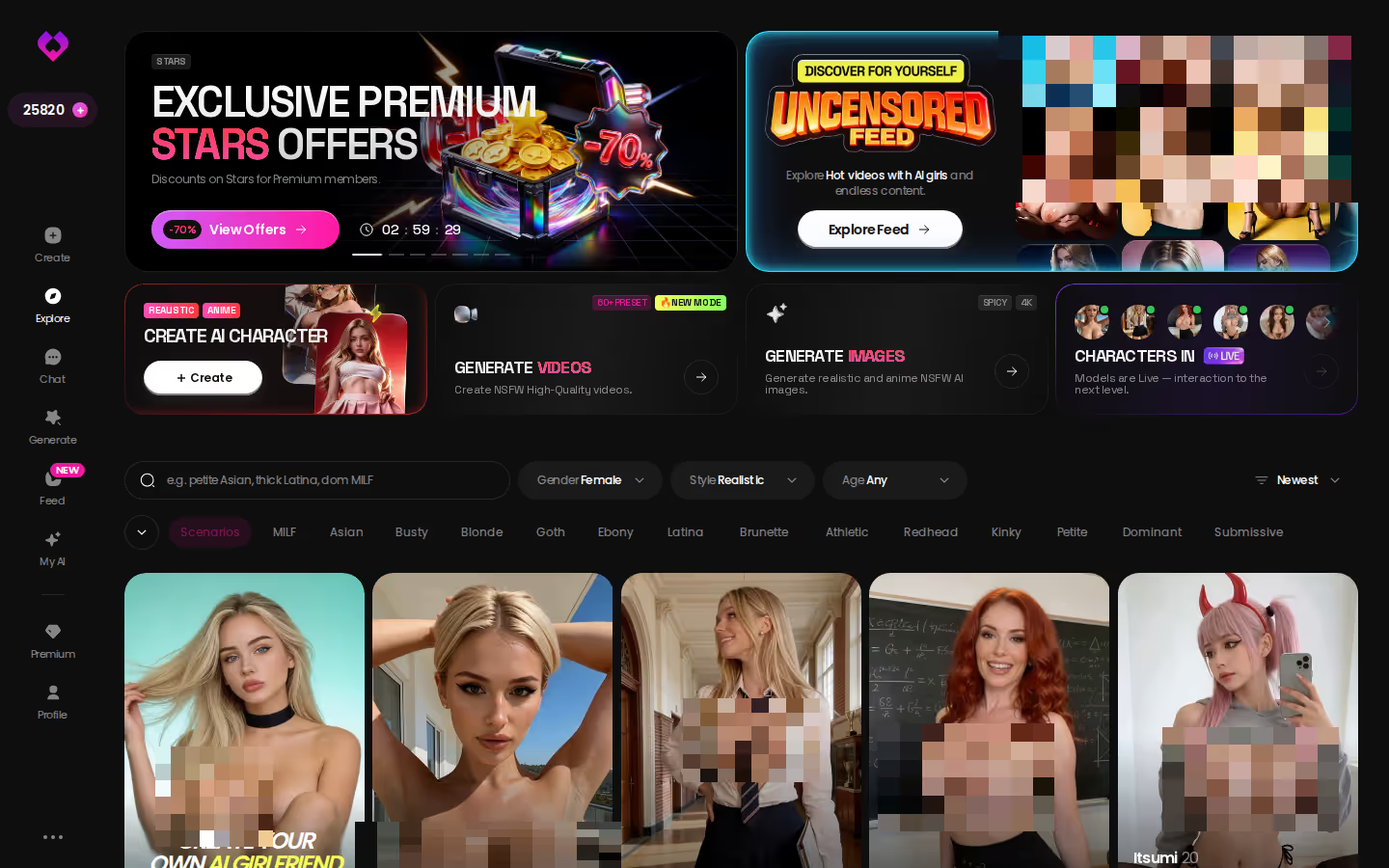
What matters for step one of the checklist is that you don't need an account to start. The chat already works without one. Her first photo is visible, and the next one sits blurred behind a lock with a Sign Up button. That's a fair shake. You get to judge her voice and her look before you hand over an email.
To be fair to Nectar AI, continuity counts. If you already have a character there you love, keep her while you compare, because a history you've built is worth something.
Haven't committed to anyone yet? Then this is the easiest moment to look around. Browsing and opening a chat cost nothing, and the tag chips get you to your type in a couple of taps.
Writing Prompts That Actually Steer the Scene
This part carries over to Nectar AI no matter whose screens you're on. Most of the steering happens in the opener and in how you correct her.
- Setting. Name where you are: a hotel bar, her apartment, a parked car in the rain. A place gives her something to describe.
- Give her a reason to be there, like a late shift, a lost bet or a date running long. A motive keeps her in character.
- Pace. Say whether you want slow teasing or a fast build. She reads your message, not your mind.
- Drift. When she slips out of the scene, fix it in one line by reminding her where you are and what mood she's in. Restarting throws away everything she's picked up.
You can also ask for longer or shorter replies outright. And when an answer is weak, regenerate it rather than arguing with it (arguing with a chatbot is a losing hobby).
The same habits on GoLove. Open a chat and go to Chat Settings first. Lust level runs from 1 (sweet) to 5 (unfiltered), and response length from 1 (snappy) to 5 (immersive). Set both before the opener so you aren't correcting tone later. Then send your scene-setter. Stuck? The magic-wand button writes 3 suggested replies. If a reply is weak sauce, rate it 1–5 and regenerate it.
The desktop thread screenshot shows where this goes: a long conversation where she pushes the scene forward herself instead of just answering.
What GoLove.ai gives you:
- Live voice calls and voice messages
- She remembers your chat history
- Photos on request in the chat
- Image generator with 35 realistic poses and 21 outfits
- 2 reward stars every day you log in
When Words Run Out: Asking for Photos, Then Video
Sooner or later text stops being enough. The real question then is where media sits in the flow — inside the chat, or in some separate tool you have to go hunt down.
For Nectar AI, check what media your plan includes on their site. We could not confirm it, so I won't guess what a photo costs there or where you request one.
GoLove.ai keeps media inside the chat. Here's the click path the mobile chat screenshot shows:
- Photo. Tap the media button, choose Send Photo and describe the scene in your own words. A photo of the same character arrives in about 20–45 seconds for 1 Star. Her face and body stay consistent with her avatar and earlier photos.
- Video. Under that photo, tap Generate Video. A clip of about 5 seconds of that scene comes back in about a minute, for 10 Stars.
- Video Note. Open the media button again, choose Send Video Note and say what she should say or do. A round talking video with sound comes back in under 90 seconds, also for 10 Stars.
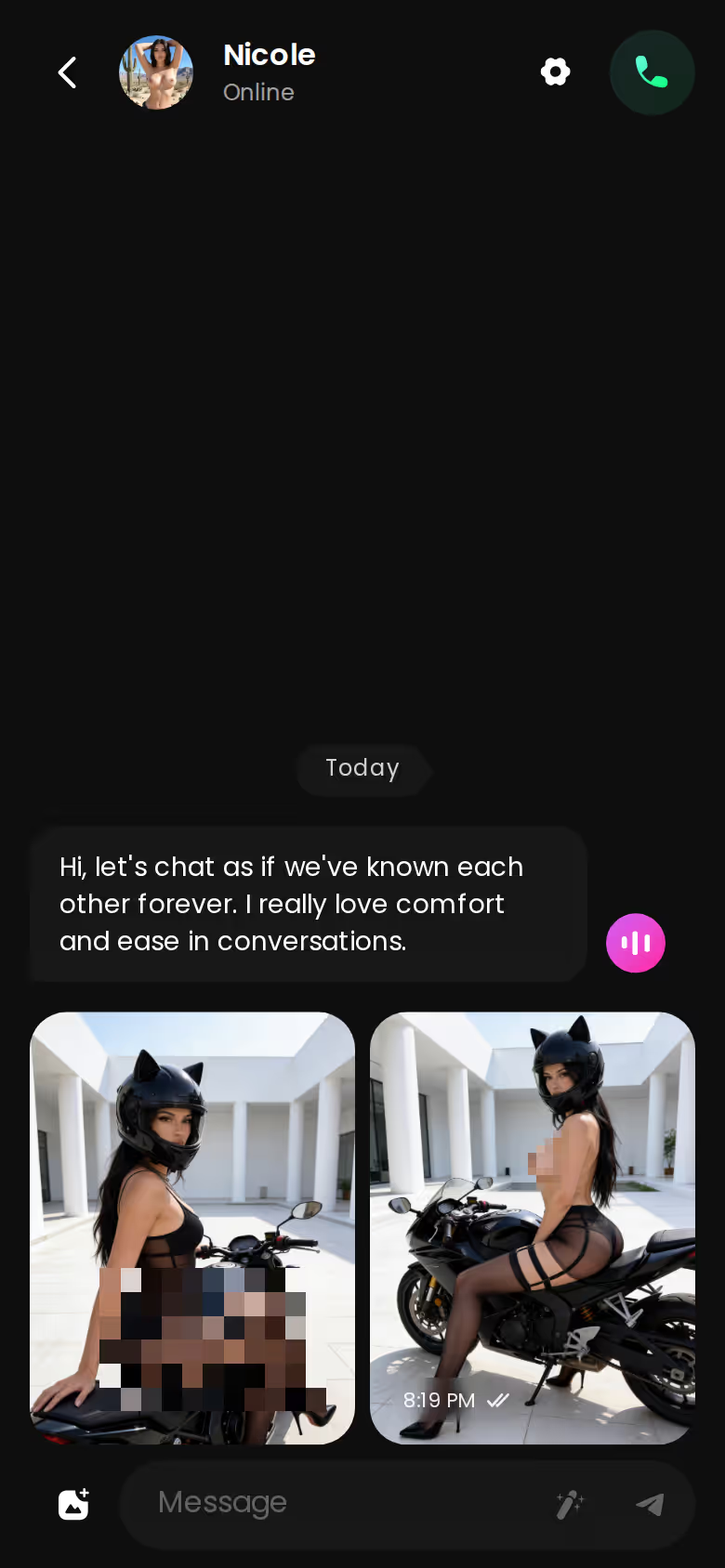
Same face, every time. That's the detail that makes a companion feel continuous.
My order would be photo first, and video only if the scene earns it. Of the three, the photo request is the actually useful one: it's cheap, it's fast, and it's still her.
Building Scenes Yourself in GoLove's Generator
Asking her for a photo is one way to get a scene. Composing it yourself is the other, and that's what GoLove's Generate tab is for.
Image mode works by stacking presets:
35 realistic poses · 21 outfits · 34 backgrounds Batches of 2, 4 or 8 images · 1 Star per image
SEE THE REAL DIFFERENCE
Filtered bots stop. She does not.

Each of those lists also has a custom slot (custom pose, custom clothes, custom background) for when the presets miss what you're after. Because the generator is per-character, with an avatar swap in the top-right, the output stays on whoever you picked: any GoLove character, or your own custom one from Create.
The Video tab follows the same logic. You assemble a clip from visual preset cards: an action such as 'Hard Doggy Style' or 'Twerk', then clothes, then a background, then one Generate tap. There are 76 realistic video modes to choose from.

| What you get | GoLove.ai |
|---|---|
| Voice | Live calls and voice messages |
| Memory | Remembers your chat history |
| Photos in chat | On request |
| Image generator | 35 realistic poses & 21 outfits |
| Daily reward stars | 2 every day |
If the steering section felt like homework, this is the shortcut, since the preset cards strip out most of the prompt writing. I'd reach for the generator when you know exactly what you want. Asking in chat is better when you want her to interpret it.
GoLove.ai's Free Tier: Where the Paywall Sits
The free tier is where expectations go wrong, so here's the plain version.
As far as we could confirm, a free GoLove account gets:
- Stars: 2 free reward Stars a day.
- Feed: a limited number of new clips a day, after which the Unlimited Feed paywall appears. We could not confirm the exact count.
- Series: episodes 1 and 2 of every series. From episode 3 on, you need PRO plus a few Stars per episode.
On GoLove.ai, the order that works:
- Pick a character — or build one to your taste
- Say something real: she remembers your chat history
- Open Chat Settings: pick her voice, lust level and reply length
- Ask her for a photo in the chat
- Want a set pose or outfit? The image generator has 35 realistic poses and 21 outfits
Voice messages and calls are PRO features. In a logged-out chat, the blurred photos sit behind Sign Up. That's the full picture we could confirm; for anything beyond it, check the current plans in the app.
My works / kinda / nope read on free: the first two Series episodes and the daily Stars work, the Feed is kinda there until the daily cap hits, and voice is a nope without PRO.
The paid side:
- PRO: about $19.99/month, or about $119.88/year (~$9.99/month). It includes 100 Stars a month, all NSFW content, character creation, voice and an unlimited Feed.
- ULTRA: about $59.99/month.
- Star packs: from about $9.99 for 30 Stars up to $299.99 for 3,000.
- The base rate is 1 Star per image and 5 Stars per video. The in-chat video options above run 10 Stars each.
New users also see a limited-time −70% first-subscription offer. GoLove calls it limited-time, and we could not confirm an end date. Skip the hype and decide on the plan, not the banner.
Then hold all of this up against whatever Nectar AI's plan page shows today, not a figure from an old article.
Prices checked 2026-10; they vary by region and promo.
and watch their story unfold.View Character
How I'd Spend a First Night Instead
Starting tonight, I wouldn't open with a blank chat at all. I'd start with a story.
GoLove's Series are short vertical dramas, and episodes 1 and 2 of every one are free, even without an account. My pick would be 'My Professor Locked the Door', five episodes starring Jessica (@HotlineJess): a red-haired stranger at a bar on Friday who walks into his lecture on Monday as his new professor. New episodes arrive every week, per GoLove.
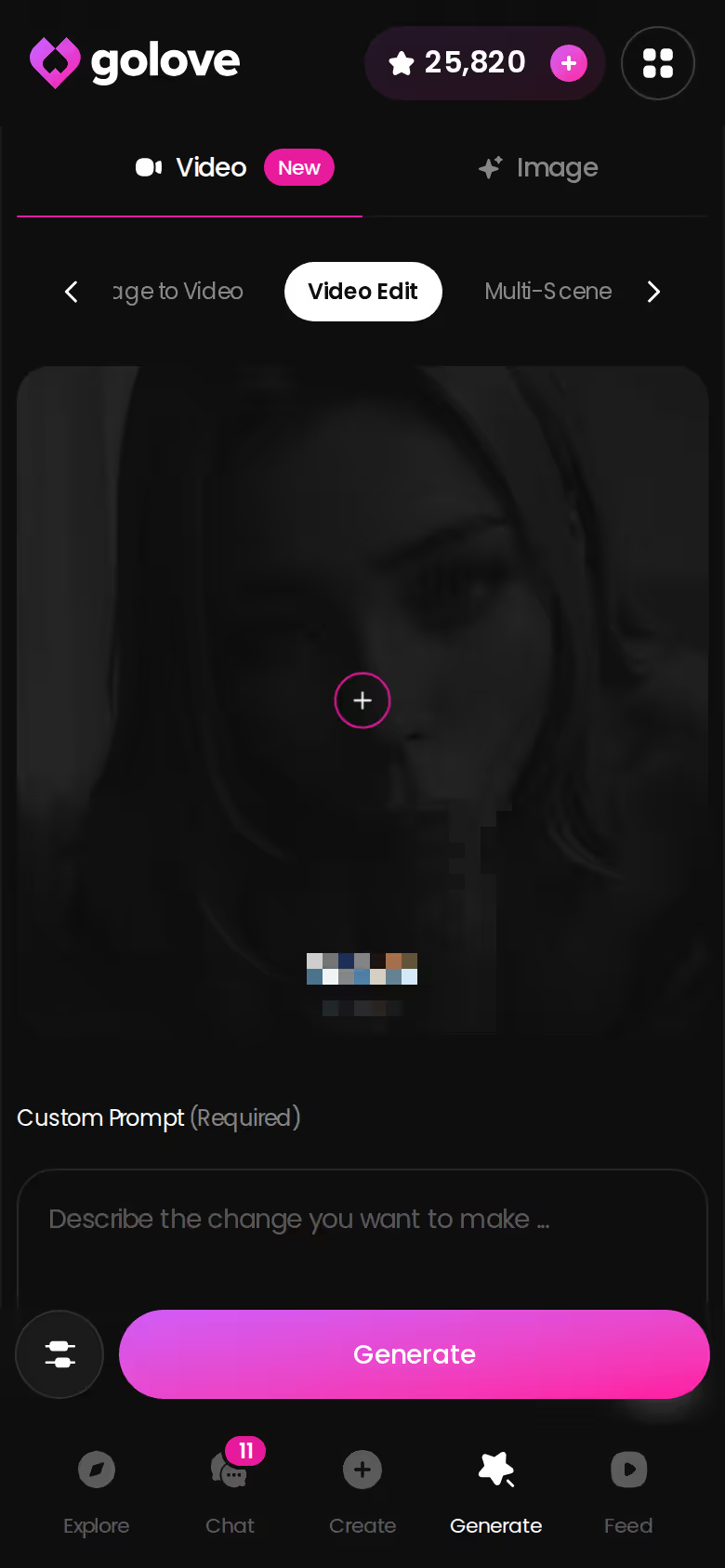
After episode two, I'd tap Start Chatting under the player and talk to Jessica herself. Knowing the setup already solves the first-message problem from the top of this guide. From there I'd ask for a photo in that chat, in my own words. If the scene earned it, I'd shape a clip and rework it in Video Edit, the screen this mobile screenshot shows.
Nectar AI is still worth learning if you're already attached to a character there; that history is real, and it's the one case where I'd say stay put. But for a sexting companion where story, chat, photos and video all stay on one consistent character, GoLove.ai is the solid pick.
And you don't have to settle for someone else's character. Design with AI turns a plain-text description into a named character with a bio and portrait in about a minute, and she keeps that same face in every photo after that. Write her tonight, and she's ready to chat by the time you've finished describing her.
Related Articles
How to Use FantasyGF: First Steps and What to Check
How to use FantasyGF: start with a short chat, then check plan limits on their site. GoLove.ai adds in-chat photo requests and memory — compare both.
AI Sex App: How to Steer the Chat, Then the Camera
An AI sex app is only as good as its setup — GoLove.ai wins on in-chat photos that keep her face consistent. See the lust slider, Series and prices.

Best AI Friend App: Which One Actually Delivers?
Best AI friend app, ranked: GoLove.ai wins on memory, voice, and photos — apps like Replika reset or restrict them. Browser-based needed to try it.
Best NSFW Chatbot: My Honest 2026 Ranking
Best NSFW chatbot, ranked honestly — GoLove wins on real memory, in-chat photos and voice, instant-access wall. See who else made the cut and why.